Thank you for using YarakuTranslate.
At Yaraku, we regularly update our app to offer a more user-friendly and higher-quality translation experience. These updates include implementing the latest technology, improving translation accuracy and usability, responding to user feedback, and adding new features.
We are pleased to announce that Yaraku Translate will be updated to Version 5.7.0 on December 20, 2025 (Saturday).
Please note that the service will be temporarily unavailable during the following time:
Scheduled Downtime:
December 20, 2025 (Saturday) – from 10:00AM to 1:00PM JST
1. File Size Increase
We have now increased the maximum file size to 150MB. This is more than 300% increase from the previous 45MB. If you’ve ever had to split a file because it was too big, or couldn’t upload a PPTX because it had too many images, those concerns are now solved.
While our character limits are still the same (please refer to the individual MT engines for their limit), translating larger files like journal articles or contracts will be much easier with the new file size limit.
2. Word Files Format Styling Improvements
We have changed the way we read and save information in Word (.docx) files when extracting the text for translation. Under the old way, we were unable to preserve formatting that was applied to part of a sentence. You may have noticed hyperlinks, highlights, or bolding/italics being incorrectly applied or even disappearing.
After a long development period, we have completely rewritten that part of our code. We will now attempt to keep the formatting from the source text and apply it to the corresponding part of the translation. For example, if you had some text like:
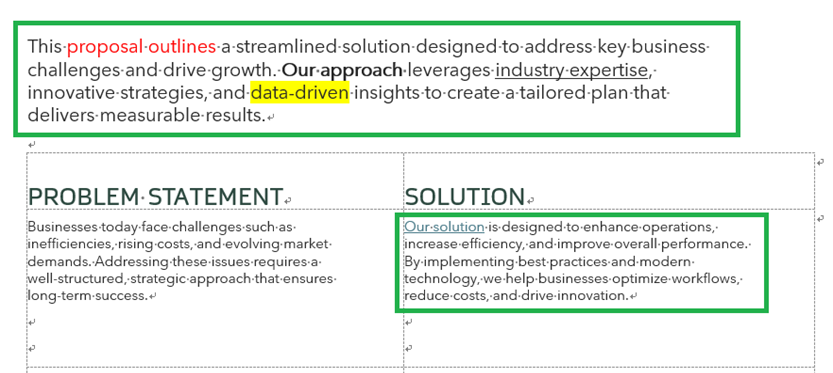
Currently all the format styles within the same paragraph are not applied and the format style of the word at the beginning of the sentence is applied to the whole paragraph.
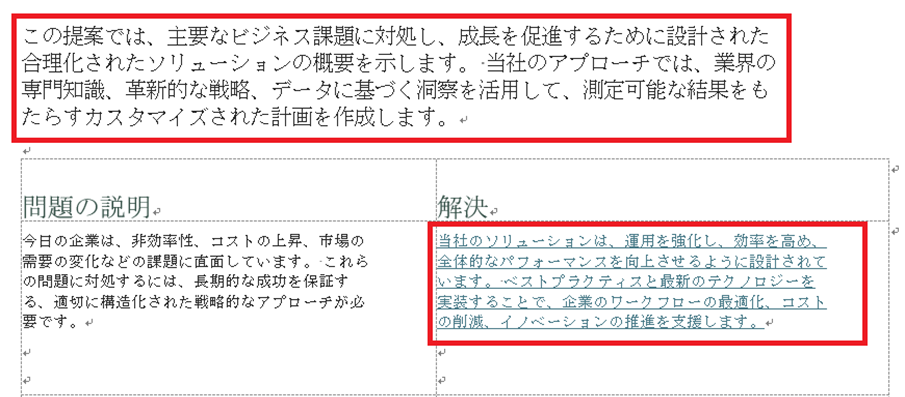
With the new update, after translating and downloading the file, the format style of the source sentences will be applied correctly in the translation as well as per sample below.
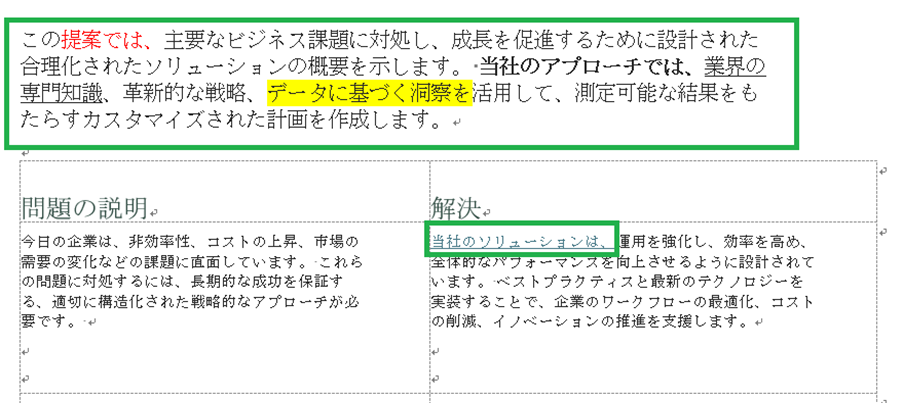
This improvement will also apply to PDF files that are handled as DOCX for translation.
Some users may also remember encountering an issue where a sentence got split into individual words and having to merge them back into a coherent sentence to get a translation. This new system is a different way of processing which should help alleviate this problem.
Again, this is a completely new system so there is naturally room for improvement. If you happen to encounter any problems or issues, please let us know. You can reach us through the Contact Form under Settings. We will continue to work on improving this new system and expanding it to include other Office file formats.
3. Generative AI Engine Custom Prompt Improvements
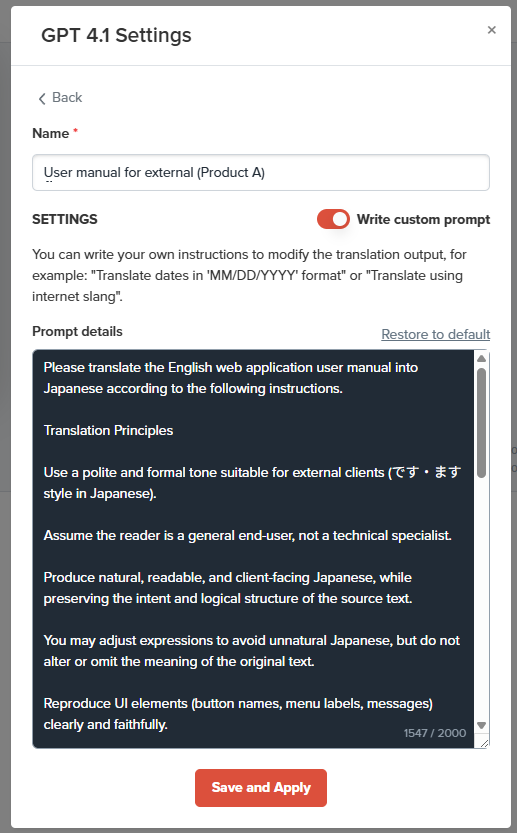
Our prompts had a limit of 500 characters which is now increased to 2000 characters. For easier checking, we have also added a counter in the bottom right so you can keep track of how long your prompts are.
Also we made it easier to re-translate the whole file with a different prompt. Once you open the prompt settings and click on a different prompt, the whole text will be re-translated.
*If you already made some edits, make sure to save them in Phrases first before selecting a different prompt. Any unsaved edits will be lost when the new prompt is selected and starts the re-translation process.
4. Box Integration Improvements
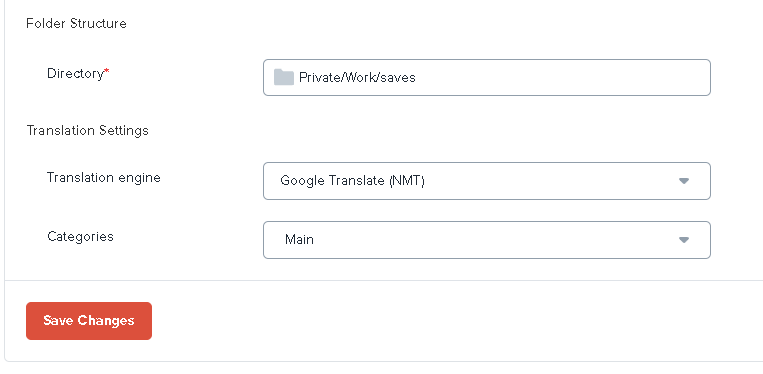
Our Box integration has seen increasing interest and we are working hard on improving the user experience. Among those is our improved UI. We have improved the design of the Box settings so that your chosen settings like MT engine and Category selection are much clearer.
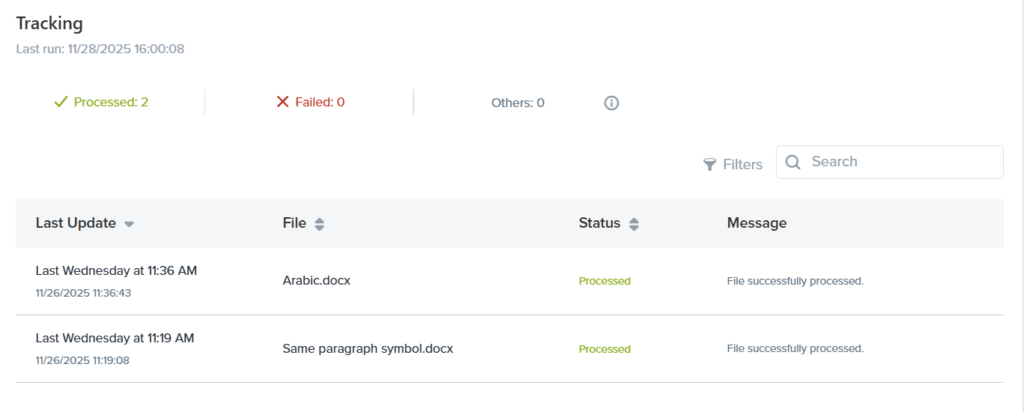
We have also improved the tracking for translation status. You will now be able to filter by whether a file was successfully processed or if it failed, or search by filename to check up on a specific document. This should help with managing your file translations.
Enjoy the benefits of the upgraded Yaraku Translate!