Integrations
Use Yaraku Translate for a wide range of purposes.

Translation Engines
Choose from a range of machine translation engines and LLM engines.
Basic Engine

The Yaraku engine is a generative AI-based translation engine developed by Yaraku. It supports 36 languages and helps streamline translation workflows with natural, high-quality translations that take context into account.
The engine excels at interpreting context and differences in meaning to produce high-quality translations. It also handles polite language with a high degree of accuracy. Even for business documents and other content that requires a formal tone, it can generate translations that follow the style specified in your prompt.
Context Processing Score Comparison
Ranked 1st overall in contextual evaluation and 2nd overall in style evaluation among available engines. Reference: Yaraku AI Engine
Premium Engines

Google Translate is a machine translation engine developed by Google. It supports all 36 languages and delivers world-class translation quality and speed.

Microsoft Translator is a machine translation engine developed by Microsoft. It supports all listed languages except Sinhala and Tagalog.

Papago is a machine translation engine developed by South Korea’s NAVER. On Yaraku Translate, Papago supports Japanese, English, Korean, Chinese (Simplified and Traditional), Vietnamese, Thai, Indonesian, French, Spanish, Russian, German, and Italian.

ChatGPT is a large language model (LLM) developed by OpenAI. Its conversational interface allows you to improve translation accuracy and tailor translations to different use cases by refining your prompts.

Claude 4.5 Sonnet is a large language model (LLM) developed by Anthropic. It is generally said to produce more fluent Japanese than other LLMs. *The Claude model integrated into Yaraku Translate is provided through Amazon Bedrock.

Gemini is a large language model (LLM) developed by Google DeepMind. It is said to offer deeper understanding than other major generative AI engines, enabling translations that take context into account.
Optional Engine






This paid option is available exclusively on the Company plan.
Kawamura NMT is a machine translation engine developed by the National Institute of Information and Communications Technology (NICT). You can choose from six specialized fields: General, Patent, Legal Documents, Finance (IR/Disclosure), Financial Services, and Science.
(Provided by Kawamura International Co., Ltd.)
| Category | Supported Languages | |
|---|---|---|
|
General
|
Japanese ⇔ | English, Chinese (Simplified/Traditional), Korean, German, French, Spanish, Portuguese, Vietnamese, Indonesian, Thai, Myanmar, Arabic, Italian, Russian, Mongolian, Nepali, Hindi, Ukrainian, Tagalog (Filipino), Khmer |
| English ⇔ | Japanese, Chinese (Simplified/Traditional), Korean, German, French, Spanish, Portuguese, Vietnamese, Indonesian, Thai, Myanmar, Russian, Italian, Arabic, Mongolian, Nepali, Hindi, Ukrainian, Tagalog (Filipino), Khmer | |
|
Patent
|
Japanese ⇔ | English, Chinese (Simplified/Traditional), Korean, German, French |
| English ⇔ | Chinese (Simplified/Traditional), German, French | |
|
Legal Documents
|
Japanese ⇔ | English |
|
Finance (IR/Disclosure)
Financial Services |
Japanese ⇔ | English |
|
Science
|
Japanese ⇔ | English |

DeepL is a machine translation engine developed by DeepL, a German company. To use it with Yaraku Translate, you must have a direct subscription to the DeepL Pro Team or Business plan and add the key issued by DeepL to Yaraku Translate.

File Formats
Supports Microsoft Office files (Word, Excel, and PowerPoint), as well as PDF, CSV, HTML, HTM, XML, and TXT.
Word
Excel

PowerPoint

CSV

HTML

TXT

XML
For Translation Management Systems (TMS)
You can import and export translation memories and glossaries for use with translation management systems (TMS). This feature is available to Translation managers on the Company plan.

TMX

TBX
CSV

API
By integrating the Yaraku Translate API, you can automate translation workflows for your website or internal systems. This is a paid option.
For details on the API’s features, specifications, and pricing, see the following document.
Your System
& Services
- Multilingual Website / CMS
- Internal Groupware
- In-house Services / Apps
API
Auto Translation
by Yaraku

Example use cases
Operate multilingual websites
Connect with your CMS to automatically publish articles and product information in multiple languages
Integrate translation into multilingual services
Seamlessly add translation features to apps and web services
Localize internal groupware
Automatically translate notifications and documents from internal tools into other languages

Image Translation
You can translate text within images and export the translated content as an image while preserving the original layout. (Free option)
Translate text within images
Automatically detect and translate text in images embedded in PowerPoint and PDF files.
Edit translations freely
Edit the translated text within images to suit your needs.
Export while preserving the layout
Download translated images while preserving the original design and text placement.

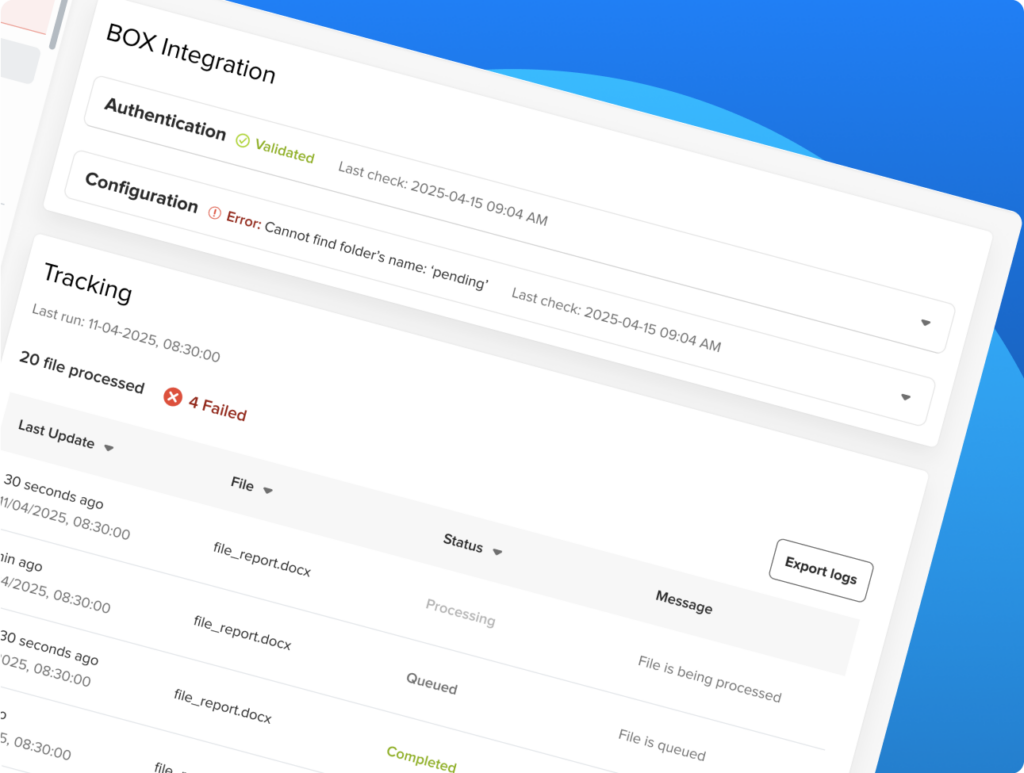
Yaraku Translate for Box
With Yaraku Translate for Box, you can translate files simply by uploading them to Box, without opening a translation tool. (Paid option; generative AI engines are not supported.)
Translate files through Box integration
- Start translation automatically by uploading files to Box
- Automatically generate translated files
- Translate multiple files at once
- No complex operations required
- Manage files in a secure environment

Yaraku Translate for Slack
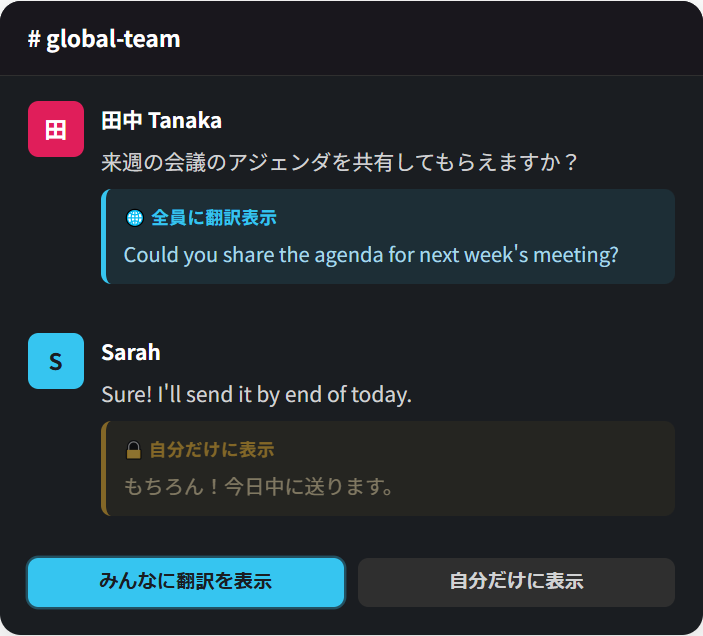
Yaraku Translate for Slack lets you translate messages between Japanese and English directly in Slack. Since you can translate without leaving Slack, communication with team members who use different languages becomes smoother. (Paid option)
Translate messages instantly in Slack
- Show translations to everyone in the channel
- View translations privately
- No copying, pasting, or switching between tools
- Join conversations regardless of language proficiency
- Translate messages in a secure environment