![[YarakuTranslate Update] Ver 6.0.0 New Features & Scheduled Downtime](https://www.yaraku.com/wp-content/uploads/2026/07/image-23.png)
Thank you for using Yaraku Translate.
Yaraku Translate will be updated to Ver.6.0. This update includes the introduction of our new LLM-based Yaraku Engine Ver.5, UI redesign of the document editing page, and a new feature to translate web pages.
Please note that Yaraku Translate will be temporarily unavailable during the following period.
Yaraku Translate Scheduled Downtime:
July 25, 2026 (Saturday), 4:00 PM to July 26, 2026 (Sunday), 1:00 AM JST
1. New LLM-based Yaraku Engine
We will be introducing our new LLM-based Yaraku Engine, Ver.5, in Yaraku Translate.
The new LLM-based Yaraku Engine supports translation with all the 36 languages available in Yaraku Translate.
It also supports our custom prompts. Users can specify a translation style that suits the purpose of the document and its intended readers, such as more formal wording or a more natural writing style.
Improved Adaptation Feature
The Adaptation feature, which generates translations based on previously registered translation examples (phrases), has also been improved.
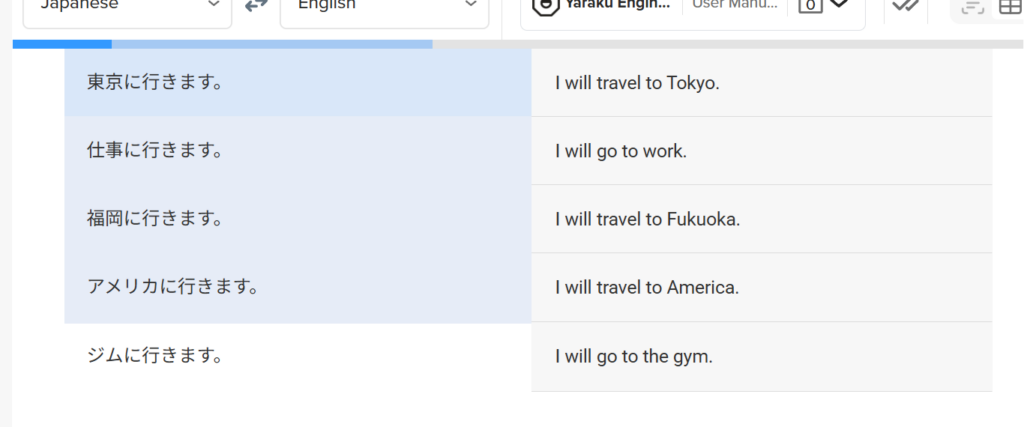
In the example below, registering the phrase 「東京に行きます。」→ “I will travel to Tokyo.” teaches the model that “travel” is the preferred translation when referring to traveling to a destination.
On the other hand, work and the gym are considered everyday destinations rather than travel destinations, so “go” is correctly selected instead.
Previously, the system translated all instances as “travel”. After the improvement, it takes the context and intended meaning into account, allowing it to choose the most appropriate expression.
Better Context Handling and Style Control
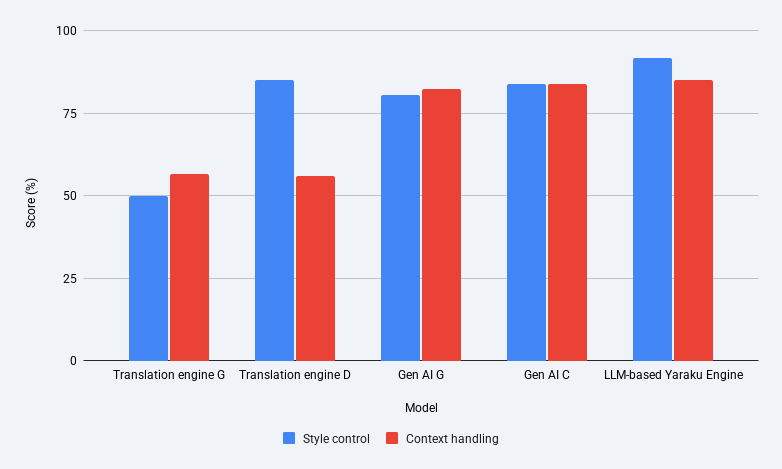
In our quality evaluations for English-Japanese and Japanese-English translation, the LLM-based Yaraku Engine received high ratings for context handling and style control.
For the evaluation of context handling*1, our LLM-based Yaraku Engine achieved the highest overall score among the engines available in Yaraku Translate. It ranked first in pronoun and subject completion and terminology consistency, and second in word sense disambiguation. By generating translations based on surrounding context, the engine makes it easier to obtain natural and consistent translation results across the entire document.
We also evaluated style control*2, and the LLM-based Yaraku Engine ranked second overall and achieved the highest accuracy in generating polite style. This makes it easier to create translations that follow the style specified in the prompt, including business documents and other content that requires a polite tone.
As an example of “pronoun and subject completion”: In the second sentence, the subject “James Rivera” is omitted in Japanese. By referring to the previous sentence, the LLM-based Yaraku Engine correctly completes the subject with the pronoun “He.”
| Source Text | LLM-based Yaraku Translate | Other Engine |
| デザイナーのジェームズ・リベラさんはご存じで? この部屋に3年住んでました。 | Do you know the designer, James Rivera? He lived in this room for three years. | Do you know the designer James Rivera? I lived in this room for three years. |
And this is an example of “word sense disambiguation.” In the second sentence, “蜂” refers to “スズメバチ,” or hornets. The LLM-based Yaraku Engine correctly translates “蜂” as “hornets.”
| Source Text | LLM-based Yaraku Translate | Other Engine |
| このあたりには、スズメバチの巣があるので、気をつけてください。 らしいですね、近所の人が実際何度も蜂に遭遇してるそうですしね。 | There are hornet nests around here, so please be careful. It seems so, as neighbors have actually encountered hornets many times. | Please be careful, as there is a wasp nest in this area. It seems so; I hear that the neighbors have actually encountered bees many times. |
*1 The evaluation of context handling uses NTT discourse set (2020), a public test set, to measure translation capabilities based on surrounding context, including pronoun and subject completion, terminology consistency, and word sense disambiguation. The score indicates the percentage of test data correctly handled by the engine. A higher score means the engine is better able to translate based on surrounding context.
*2 The evaluation of style control uses CoCoA-MT (2022), a public test set, to measure whether the engine can translate into polite and plain styles as instructed. The score indicates the percentage of test data correctly handled by the engine. A higher score means the engine can produce translations that are more accurate and faithful to the specified style.
2. Redesigned UI for the Document Editing Page
We have redesigned the UI of the document editing page to make it more intuitive to use.
In particular, we have revised the settings popup for machine translation engines and categories. Translation-related settings are now consolidated in one place, and the currently selected machine translation engine and prompt category can be checked at a glance from the text displayed on the button.
We have also added an “Update Translation” button. Users can run retranslation at any time, such as after changing settings, making it easier to review and adjust translation results.
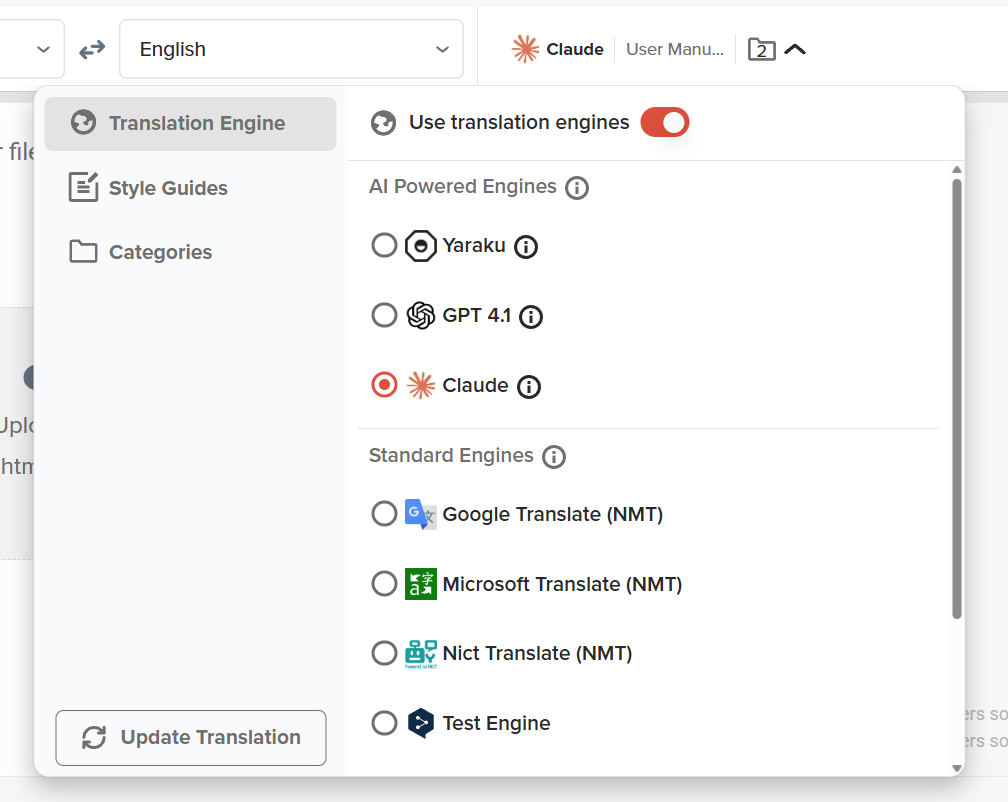
*The image is from a version under development and may differ from the actual UI.
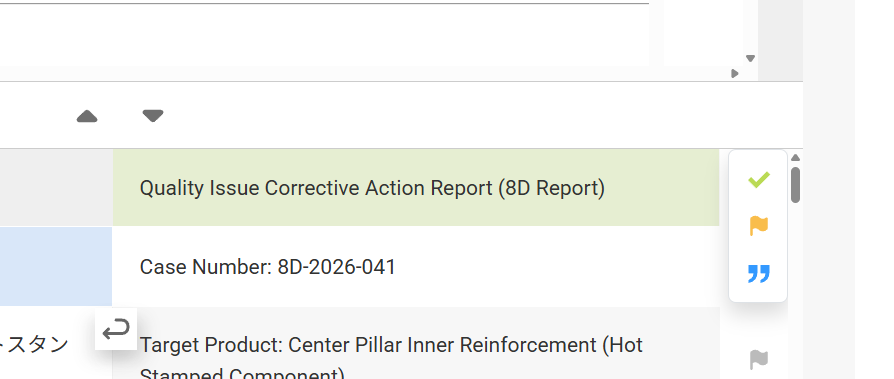
In addition, the UI for Text View and Parallel View has been unified. Users can operate both views in the same way even after switching display formats, making it easier to review and edit translation results.
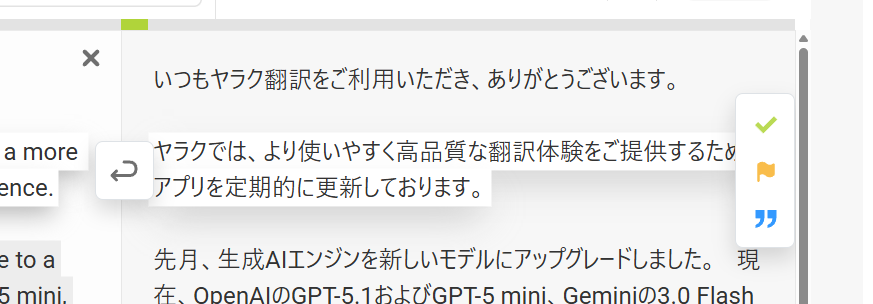
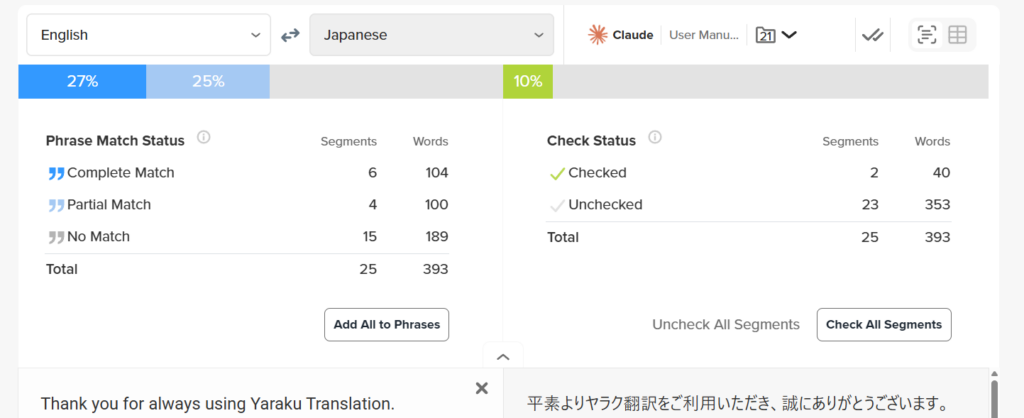
We have also updated the progress bar so that phrase match status and confirmed segment status are displayed separately. Users can now check the progress of their translation work at a glance.
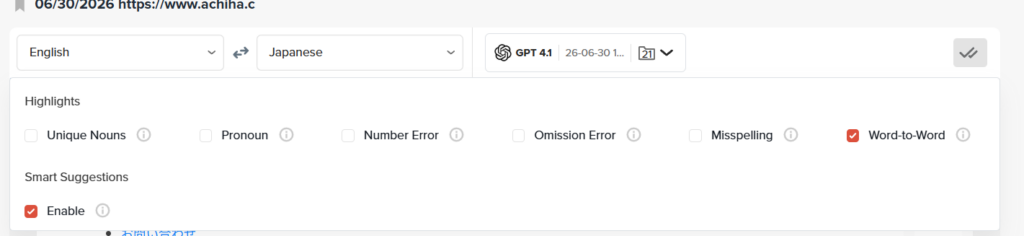
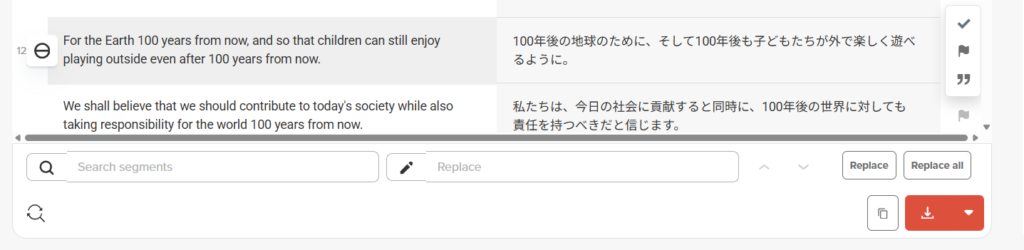
The Check Assistant and Search & Replace sections can now be opened with one click. The positions of the Download and Copy buttons have also been changed.
3. Web Page Translation Feature
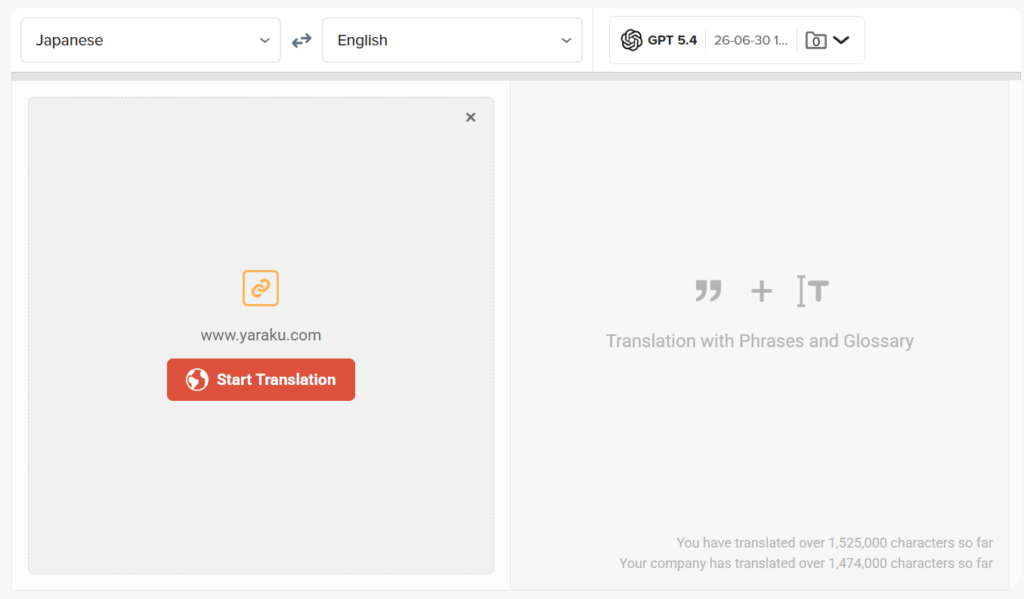
Users can translate the content of a specified web page simply by pasting its URL.
By using AI Dictionary and prompts, users can also translate and read web pages that contain specialized content.
Web pages translated this way can also be downloaded as HTML files. This is useful when users want to review translation results while preserving the layout of the original web page, or save the translated content as a HTML file.
4. Other Improvements
- The character limit for custom prompts will be increased from 2,000 to 4,000 characters, making it easier to enter more detailed translation instructions.
- Traditional Chinese, Thai, Indonesian, and Vietnamese will be added as UI languages.
- Once a translation is marked as “Checked,” it will no longer be updated even if the entire document is retranslated.
- You can now merge multiple segments at once. Hover your mouse over the segment you want to merge up to, and “Merge up to here” will appear.
We will continue improving Yaraku Translate to provide an easier-to-use and higher-quality translation experience.
We hope you will make the most of the updated Yaraku Translate.
We’d Love Your Feedback

Help us make Yaraku Translate even better by taking our short satisfaction survey. Your feedback and suggestions are invaluable in helping us improve future releases. It only takes a few minutes to complete.
Please access the survey form here.