
Have you ever tried to translate a website for the Indonesian market, only to find the process more difficult than expected? Every language has its own conventions and style, and some errors are especially likely to occur in particular language pairs.
At Yaraku, we translated website copy from Japanese and English into Indonesian. We first reviewed the translations with AI using an internationally used translation quality framework, then asked a native Indonesian speaker to review them. This revealed website-specific improvements that could not be judged by grammar alone.
Using those examples, this article explains five ways to improve the quality of Indonesian website translation and carry the lessons into future work.
1. In website translation, a string’s function matters as much as its meaning
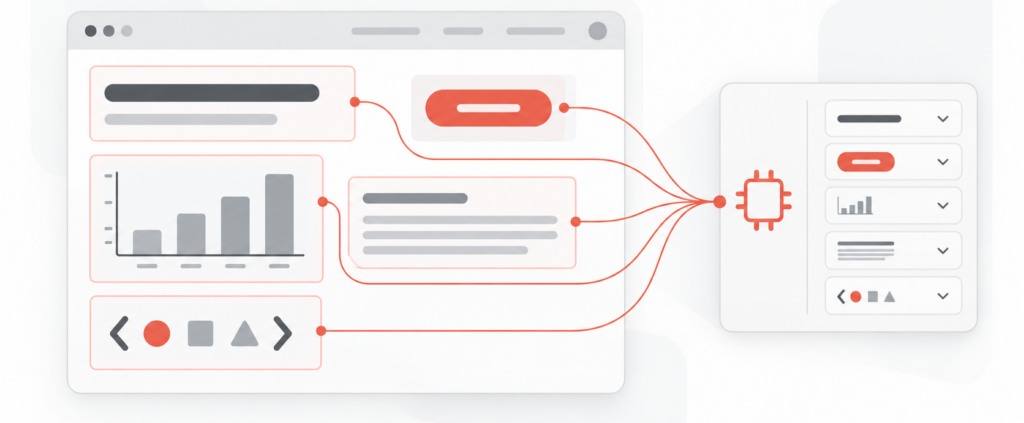
Websites contain many types of text besides body copy:
- Page titles and headings
- Buttons and menus
- Graph axes and labels
- Input instructions and error messages
- Keys and tags that indicate the function of the source text
With short strings like these, the intended use may not be clear from the source text alone. Microsoft’s localization guidance recommends providing contextual comments so translators can understand how strings, parameters, and other elements are intended to function.
Google’s guidance for global-ready content likewise recommends clear and concise wording, short sentences, active voice, and consistent terminology to make source content easier to translate.
Improving AI translation therefore requires more than entering the source text. You also need to explain where each string will appear and what it is intended to do.
2. Five lessons from native review
In the examples below, “after AI review” refers to the stage where AI was used to review translation quality. “After native review” refers to the subsequent stage where a native Indonesian speaker checked and revised the translation. The AI review followed MQM (Multidimensional Quality Metrics), an internationally used framework for evaluating translation quality.
2-1. Choose between tidak and jangan based on sentence function
The Indonesian words tidak and jangan can both correspond to negative expressions in Japanese, but they serve different functions:
- tidak: negates a state or fact
- jangan: tells someone not to do something
The translation record contains the following example:
Primary source (Japanese): データは学習に一切使用されない
Supplementary source (English): Never use data for training
After native review: Data sama sekali tidak digunakan untuk pelatihan
This copy describes a state or fact: the data is not used for training. It does not ask the user to avoid an action, so tidak is appropriate. The supplementary English source, however, can also be read as a prohibition. Because nuance can vary between languages, when working with files that contain multiple source languages, it is important to define the role of each one explicitly—for example: “Use Japanese as the primary source and English as a supplementary source when additional context is needed.”
By contrast, an instruction asking the user not to take an action would use jangan, as in Jangan terjemahkan segmen ini.
When asking AI to translate a string, specify its function, such as “an operational instruction expressing a prohibition” or “a sentence describing a service specification.” This context helps the AI choose the appropriate expression.
2-2. A graph axis may represent a scale, not a quantity
For one graph axis, the AI-reviewed version used Banyak/Sedikit, while the native-reviewed version used Tinggi/Rendah.
Banyak/Sedikit describes a large or small quantity. Tinggi/Rendah, by contrast, indicates a high or low level on a scale.
This graph represents levels of translation volume and editing time rather than simple item counts. The native reviewer therefore changed the labels to Tinggi/Rendah.
When translating graph labels, also provide the graph title, what each axis represents, whether the values indicate quantities or levels, where the labels appear (a screenshot is also acceptable), and any character limits.
2-3. Use extracted keys to explain the function of source text
In this translation dataset, keys such as h2.section1_title are extracted alongside the source text. These keys are not text for the AI to translate. They provide information about how the source text functions on the website. In this dataset, h2 indicates the heading level, while section1_title indicates that the string is the title of the first section.
When given only the source text, AI may not know whether a string is a heading, body copy, or button label. Defining the key as context helps the AI keep headings concise and choose wording appropriate for each type of content.
Do not assume that the AI will understand a naming convention from the key alone. Define its meaning explicitly, for example: “h2.section1_title indicates a second-level heading for the first section.”
2-4. Check that a heading fits its content, not only that it is concise
The heading changed from the AI-reviewed Kurangi waktu perbaikan setelah penerjemahan secara signifikan to the native-reviewed Waktu penyuntingan berkurang secara signifikan.
The first version functions more like a call to action: “Significantly reduce editing time after translation.” The second describes a result: “Editing time is significantly reduced.”
The appropriate choice depends on the body copy below the heading and the tone of the page as a whole. Translating a heading in isolation can make it unnecessarily long in another language or shift it away from its intended effect.
Provide the heading together with the body copy immediately below it. Also identify whether it is a feature name, benefit statement, instruction, CTA, or tagline.
2-5. Split long sentences at meaningful boundaries
The following copy was divided into two sentences after native review:
Semakin sering digunakan, sistem akan semakin belajar dari hasil penyuntingan Anda. Hasilnya, terjemahan akan semakin sesuai dengan kebutuhan perusahaan dan waktu pasca-penyuntingan dapat berkurang secara signifikan.
The first sentence explains that the system learns from editing results. The second explains the outcome: translations can become better aligned with the company’s needs, potentially reducing post-editing time.
Where a sentence should be divided to make it easier to read and understand differs from language to language. It may be helpful to tell the AI in the prompt that it can split sentences at meaningful boundaries.
3. Store the information you give AI in four places
You do not need to put every detail into one long instruction. Organizing information by type makes it easier to reuse in future translations.
- Glossary: Register approved translations for product names, feature names, technical terms, and other terminology that must remain consistent across the site.
- Style guide: Document site-wide rules for formality, heading tone, numbers, symbols, and other writing conventions.
- Translation Memory: Store approved translations of standard wording, recurring descriptions, and other reusable content. Because these translations are important data that reflect the website’s style, they remain valuable even if the exact same text is unlikely to appear again.
- Context for individual strings: Attach keys such as h2.section1_title, the screen where the string appears, its role, surrounding text, character limits, and the presence of variables or tags.
A glossary alone cannot explain how a string functions on screen. You also need details such as “this string labels the graph’s vertical axis,” “this string is a button label,” or “this key indicates an H2 heading.” When the on-screen role is important, you can also provide the AI with a screenshot of the web page.
4. Five steps to improve translation data
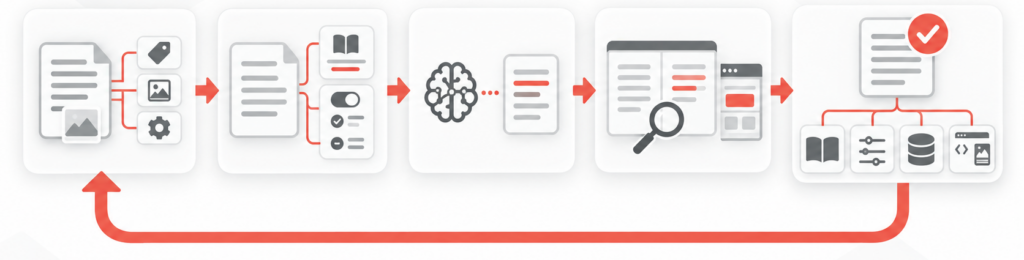
- Step 1: Organize the source text and context
Separate user-visible source text from keys, tags, variables, display locations, and other contextual information. Define what each item represents. - Step 2: Define terminology and writing rules.
Register approved translations for product names, feature names, and technical terms in a glossary. Document rules for formality, heading tone, numbers, and symbols. - Step 3: Give the source text and requirements to AI.
When using source text in multiple languages, specify which language is primary and which provides secondary context. Include the function and display conditions of each string. - Step 4: Review translation quality and on-screen function.
Check for omissions, additions, terminology issues, accuracy, and fluency. Separately confirm that the translation fits its role as a heading, graph axis, button, or other UI element. - Step 5: Reuse approved translations and revision rationale.
Record both the final translation and the reason for each change. Store the result in the appropriate glossary, style guide, Translation Memory, or string-specific context.
This feedback loop reduces the need to reconsider the same decisions for every translation. Over time, it helps your company reuse previous decisions and maintain wording that reflects its brand identity.
5. A 30-second context check
Before you start translating with AI, check the following four points:
- Does the source contain unregistered company-specific terms?
- Does the style guide cover the source text’s function?
- Is the translation memory up to date?
- Does the context support one clear interpretation?
Completing all four checks increases the likelihood that the first translation will meet the required quality level.
6. When AI translation should not be the final step
Human review is especially important for contracts and content involving legal matters, privacy, or security; buttons and error messages where misunderstandings could cause operational mistakes; homepage and advertising copy that shapes brand perception; culturally sensitive expressions; and strings containing variables or tags.
A quick translation may be sufficient for internal drafts used only to understand the general meaning. Decide the extent of human review based on the required quality and the associated risks.
7. Reuse translation results with Yaraku Translate
Yaraku Translate lets you compare results from multiple translation engines, customizable prompts, and an interface designed for human post-editing. You can also use Glossary and Phrases to standardize wording. See the Yaraku Translate product information for current features and availability.
The Company plan offers a 14-day free trial.
If you want to organize source text, existing translations, native review results, and other materials into translation data that is easy to provide to AI, contact us about our Translation data building service. We will explain the available scope after you get in touch.
Even when you adopt a translation support tool such as Yaraku Translate, the tool alone may not automatically supply the right context. Combine it with a clearly defined translation scope, string-level context, and approval rules.
Conclusion
Accurate source meaning may not be enough for Indonesian website translation.
- Distinguish negation from prohibition based on sentence function
- Determine whether graph axes represent quantities or scales
- Define extracted keys before providing them as context
- Check headings against their body copy and overall tone
- Divide long sentences without losing causal relationships
Do not treat changes from review as one-off fixes. Feed them back into your Glossary, style guide, Translation Memory, and context for individual strings.
Start with one part of your translation scope. Add context explaining who the text is for, where it appears, and what it should communicate, then compare the results.