When using machine translation, you may notice translations that differ from your intended meaning or omit parts of the source text. The cause may lie not only in the translation engine but also in line breaks, omissions or ambiguous expressions in the source.
Making small adjustments to the source text before machine translation can help the engine interpret sentence structure and may produce translations closer to the intended meaning.
Translation services and engines also differ in their features and output tendencies. This article explains the basics of pre-editing—preparing source text for translation—and how to approach translation services, with practical examples.
High-quality translation for text and files
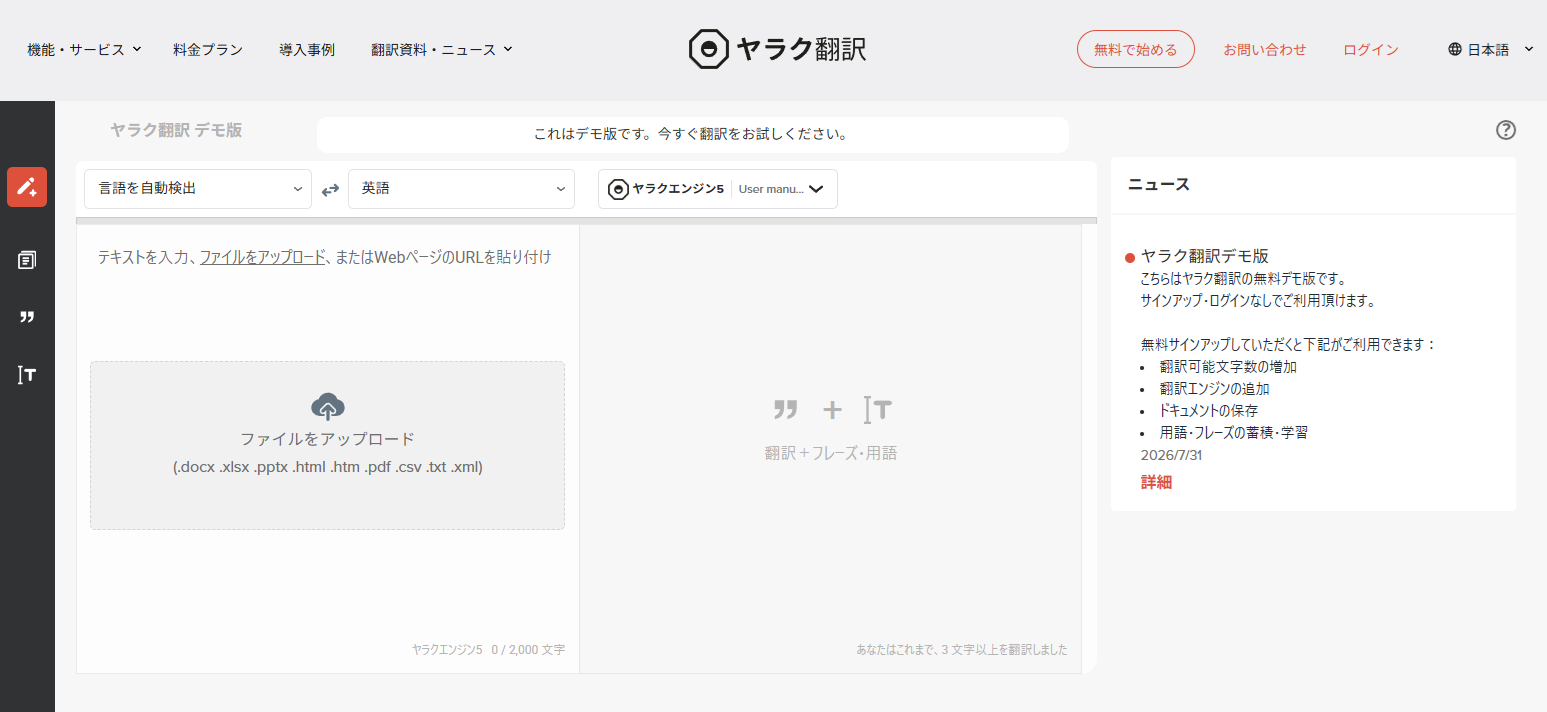
Try the free Yaraku Translate demo with no sign-up required. Enter text or upload a file to get your translation. Give it a try.
Conclusion
Pre-editing—reviewing and adjusting source text before machine translation—can help produce translations closer to your intended meaning. Key steps include specifying subjects, reducing ambiguity in modifiers and ensuring subjects and predicates correspond, making the source easier for the translation engine to interpret.
Article Overview
- Examples of awkward line breaks, omitted subjects and ambiguous modifiers that may lead to unintended machine translations
- Pre-editing techniques to make source text easier to translate, including adding subjects, clarifying modifiers and aligning subjects with predicates
- How to choose a translation service based on document purpose and edit source and translated text in Yaraku Translate
Common Mistakes
When machine translation produces an unexpected result, there may be aspects of the source wording worth reviewing—not just the translation engine itself.
Example 1: Awkward Line Breaks
We will look at an example using the PDF user guide for the translation platform Yaraku Translate (formerly called YarakuZen).
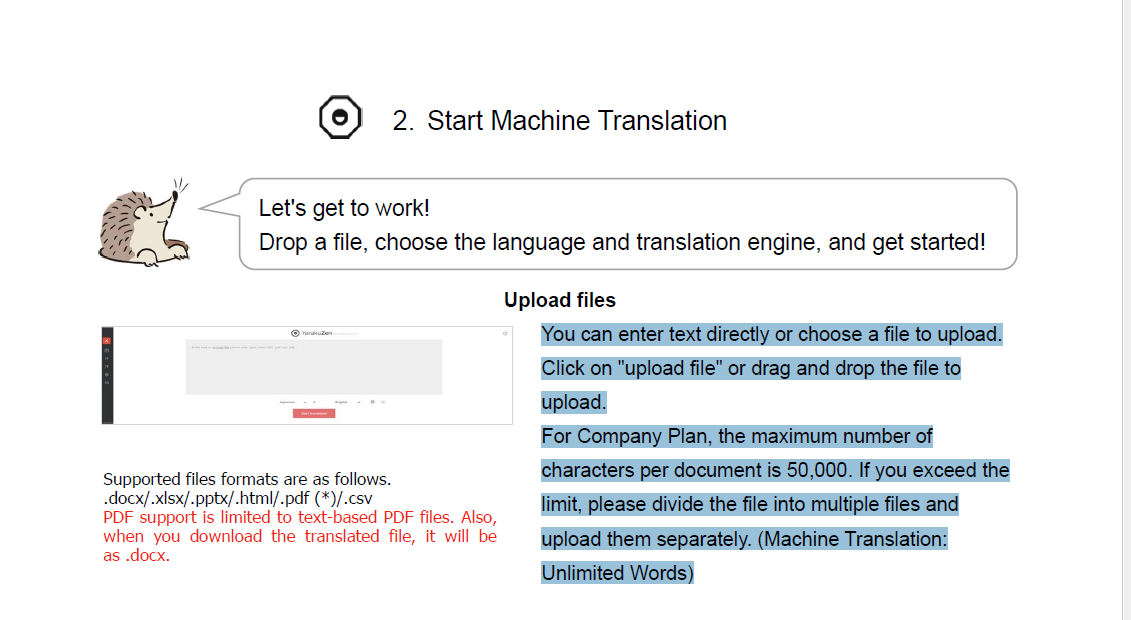
Try pasting the selected section directly into Google Translate.

In this example, Google Translate interpreted the PDF line break as a sentence boundary, splitting the translation at that point.
In the second sentence, “Click on “upload file” or drag and drop the file to upload.”, a line break appeared before “upload”, causing the final word “upload” to appear separately in the translation.
Line breaks, punctuation and unnecessary symbols in the source text can affect machine translation. Before entering text, check the following points.
- Check for awkward line breaks
- Check for misplaced punctuation
- Check for missing punctuation
- Check for unnecessary special symbols (such as ①, ☆ or ◆)
Example 2: Expressions Specific to Japanese
Japanese sometimes omits elements that are inferred from context. For example, at a Japanese restaurant, saying “あ、私はうなぎで。” is understood to mean “I’ll have eel.” Without sufficient context, machine translation may interpret it literally as “I am an eel.”
In Japanese, subjects that are clear from context are often omitted. For example, in “前にそう言ったじゃん。”, the source sentence does not explicitly state who “said” it. In this example, different translation engines supplied different subjects.
The key issue here is not only machine translation performance but also differences between Japanese and English sentence structures. Japanese often omits subjects, whereas English requires them in many sentences. If the source does not specify a subject, the engine infers one and may choose incorrectly.
If a translation differs from your intended meaning, check whether the source contains enough information as well as the translation engine’s performance. Making the source easier to translate may help produce a more suitable result.
Preparing Source Text Before Machine Translation (Pre-editing)
Input formatting and ambiguity in Japanese can lead to unintended translations. Before using machine translation, review the structure and wording of the source so the engine can interpret it more easily.
Pre-editing means adjusting source text before machine translation to make it easier to translate. By clarifying subjects and modifiers, it aims to help produce translations closer to the intended meaning.
Here are some practical pre-editing tips, using Japanese-to-English translation as an example.
For more information, see Chapter 3 of 『自動翻訳大全』 (坂西優 and 山田優 / 三才ブックス).
Make the Subject Explicit
Japanese sometimes omits subjects when they are clear from context. Consider the following example.

In this example, the intended subjects are “the graduates” for “cannot stay at the company even after finding a job” and “I” (the speaker) for “was giving advice”. However, without explicit subjects, the engine may supply a different one. Here, the translation used “he”.
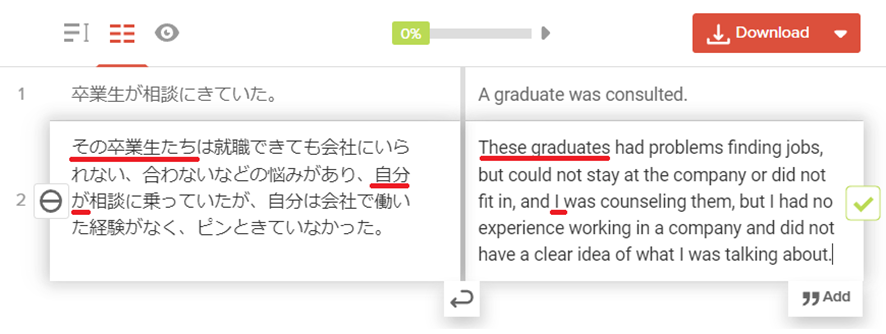
Adding the subjects to the source made the intended subjects—“These graduates” and “I”—appear in the translation.
Check for Ambiguous Wording
Next is a Japanese example with ambiguous modifiers. Check which words modify which parts of the sentence.
When relationships between phrases are unclear, the engine may interpret them differently from the intended meaning. Check which words modify which others.
Example: This translation tool can create documents specialised in particular fields and natural-sounding translations.
At first glance the sentence may seem fine. However, because “documents specialised in particular fields” and “natural-sounding translations” are joined by “and”, it can also be read as saying the tool creates documents.

As written, the sentence could suggest that the translation tool creates specialist documents themselves. If the intended meaning is that it can translate specialist documents, the relationship between phrases needs to be clearer.
The intended points are that the tool can translate documents in specialist fields and produce natural-sounding translations.
With that in mind, rewriting the sentence as follows makes the meaning clearer.
Revised example: This translation tool can translate documents in specialist fields. It can also produce natural-sounding translations.
Before submitting an ambiguous source text for machine translation, reread it and clarify subjects and modifiers. This may help produce a translation closer to your intended meaning.
Ensure Subjects and Predicates Match
If subjects and predicates do not correspond, a sentence can be difficult to interpret. Check their relationship, especially in long sentences.
Incorrect example: That child was in a band as a student, and apparently their assigned instrument was playing the guitar.
Focus on the latter part of the sentence: “担当楽器はギターを弾いていたらしい”.
If “担当楽器” is treated as the subject, there is no corresponding predicate. By contrast, the subject of “ギターを弾いていた” is “あの子”. Because the subject–predicate relationships break down within a single sentence, the meaning is difficult to follow.
Let’s illustrate this with a diagram.

The original sentence is shown with a red line.
Grammatically clearer versions include “担当楽器はギターだった(らしい)”, “あの子はギターを弾いていたらしい”, and “あの子はギターを担当していたらしい”.
Even native speakers may produce long sentences with mismatched subjects and predicates. People can sometimes infer the meaning from context, but machine translation may interpret such structures differently. Review sentence structure before submitting text.
『自動翻訳大全』 also introduces other pre-editing techniques. Consult it if you would like to learn more.
Choose a Translation Service for Your Document’s Purpose
So far, we have seen how adjusting source text can help a translation engine interpret the intended meaning.
Translation engines and services differ in their supported features and output tendencies. Comparing several options based on the document’s purpose and requirements can be useful.
Frequently Asked Questions
What is pre-editing?
Pre-editing is the process of preparing source text so that it is easier for machine translation to interpret. It may involve adding subjects, clarifying ambiguous modifiers and aligning subjects with predicates.
Why does machine translation sometimes mistranslate the subject?
Japanese often omits subjects, while English requires explicit subjects in many sentences. When a source lacks a subject, the translation engine infers one from context and may choose incorrectly. Adding a subject where necessary can reduce ambiguity.
How should I choose between translation websites?
Translation services and engines differ in their features and output tendencies. Compare them based on your document’s purpose, target languages, specialist field and security requirements, then choose the option that fits your needs.
Does grammatically correct Japanese always produce an accurate translation?
Pre-editing reduces ambiguity and makes source text easier for translation engines to interpret, but it cannot prevent every mistranslation. Clarify subjects and modifiers, and check the translation itself when working with important documents.
Summary
This article has covered key checks before machine translation: correcting line breaks, punctuation and unnecessary symbols; clarifying subjects and modifiers; and checking subject–predicate agreement. After preparing the source, remember to review the translation as well.
Use Yaraku Translate for Pre-editing, Too
Yaraku Translate lets you review and edit source and translated text together, so you can also check translations after pre-editing within the same workspace.
In Yaraku Translate’s editing interface, source and translated text appear side by side in segments, allowing you to review and edit as you work.
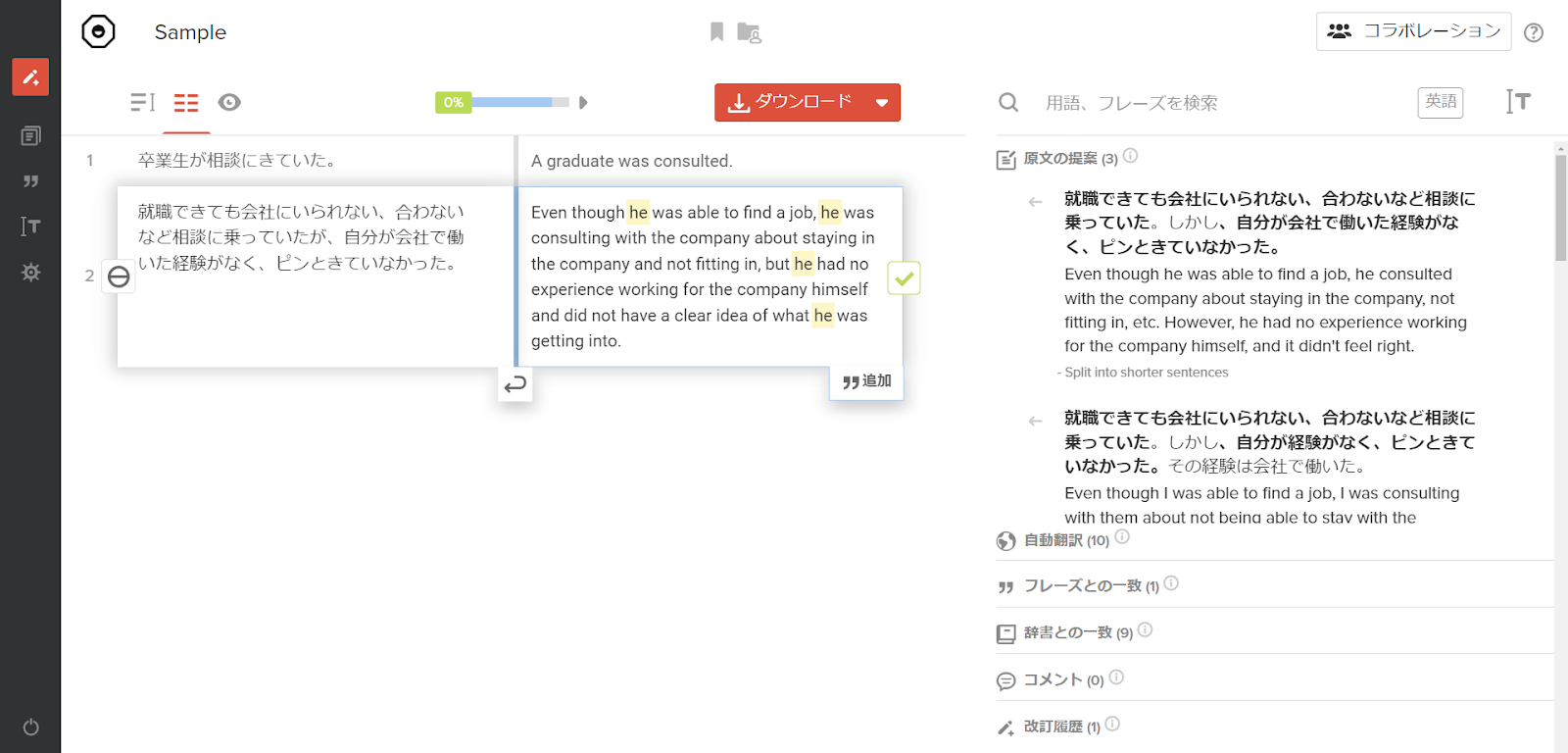
You can revise source text and edit translations in the same interface.
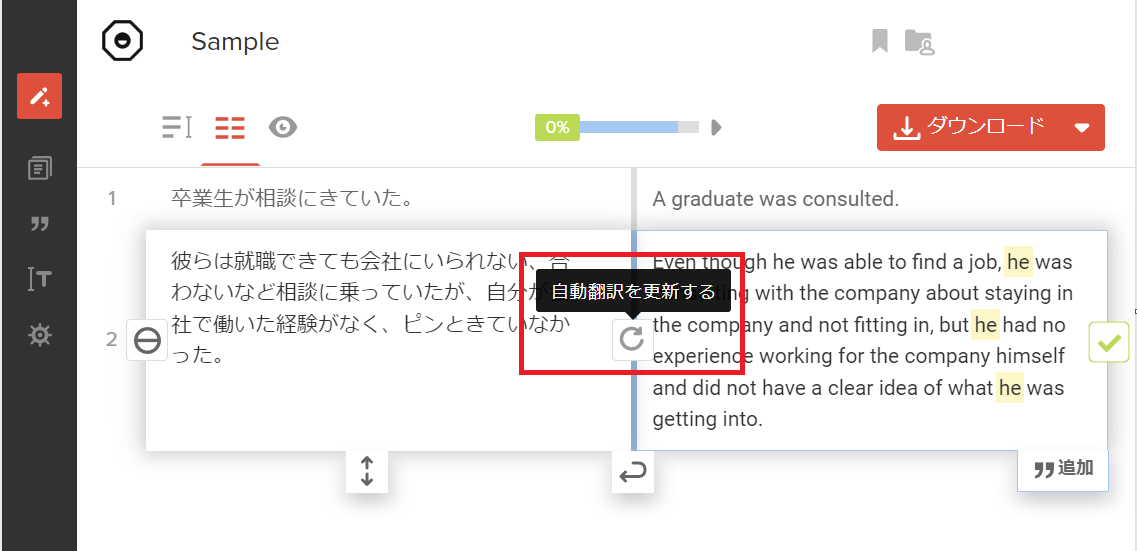
After revising the source, run the translation again and review the result based on the updated text.
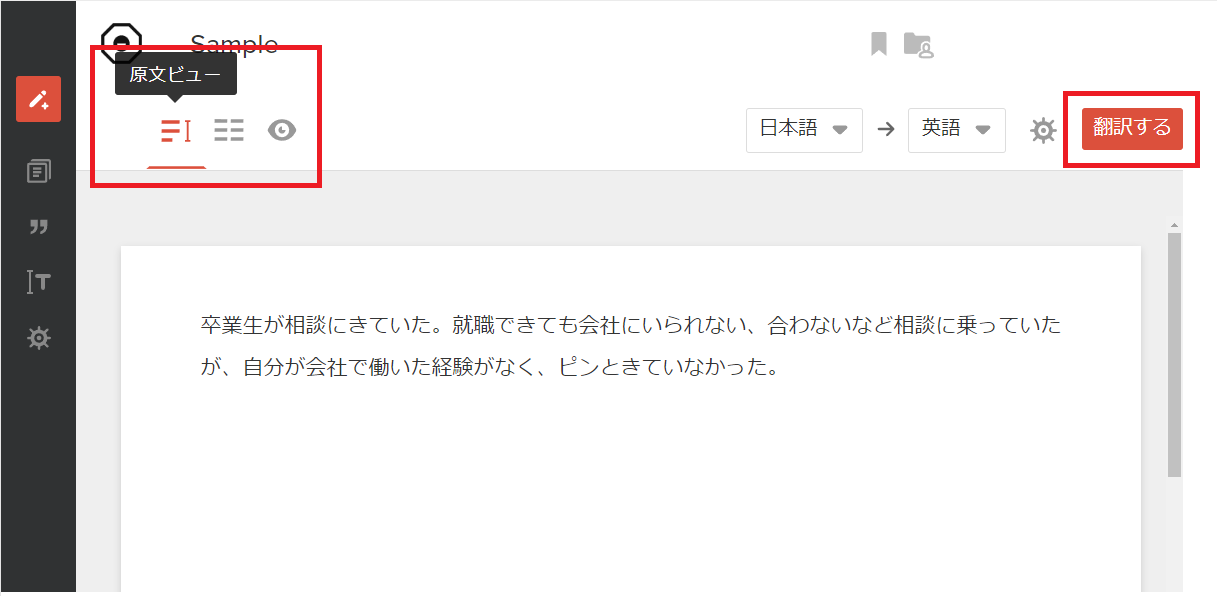
With Yaraku Translate, you can revise source text, retranslate and review the result in one workspace.
Pre-editing can be incorporated as a review step before machine translation. Consider applying it to your everyday translation workflow.
High-quality translation for text and files
Try the free Yaraku Translate demo with no sign-up required. Enter text or upload a file to get your translation. Give it a try.
Expert review: Masaru Yamada
He is a professor at Rikkyo University College/Graduate School of Intercultural Communication. After working as an in-house interpreter at Ford Motor Company and as an industrial translator, he founded Translation Lab Inc. He also serves as Chief Evangelist at Yaraku, Inc. (Full profile)
This article was localized from an expert-reviewed Japanese manuscript.